Exploring Sunflower 2 Swag: A Practical Guide for Digital Crafters and Journal Enthusiasts
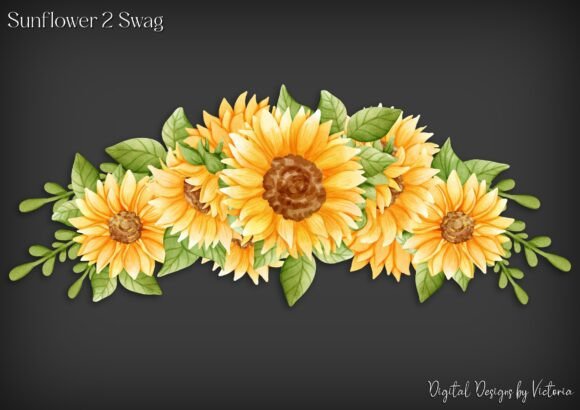
In the evolving landscape of digital crafting, the distinction between a generic image file and a thoughtfully prepared design asset can significantly impact the quality of your final project. Sunflower 2 Swag represents a specific category of digital ephemera designed with versatility in mind. For adults engaged in card making, junk journaling, or scrapbooking, understanding the technical specifications and practical applications of such resources is essential for achieving professional-looking results without the steep learning curve associated with advanced graphic design software.
This guide examines what makes this particular collection distinct, how it compares to other digital formats available on the market, and helps you determine whether it aligns with your creative workflow and printing needs.
Understanding the Technical Composition
The core value of any digital download lies not just in the aesthetic appeal of the imagery, but in its structural organization. Sunflower 2 Swag is delivered as a set of six PNG files. The choice of Portable Network Graphics (PNG) is deliberate and critical for crafters. Unlike JPEGs, which use lossy compression and often introduce artifacts around sharp edges, PNGs support lossless compression and, more importantly, transparency.
Each layer in this collection is provided on its own transparent background. This separation is a significant advantage for users who wish to customize their layouts. For instance, if you are creating a layered collage for a junk journal, having the sunflower petals, stem, and center as separate elements allows you to rearrange them, change their opacity individually, or place text between layers. This level of control is rarely available in pre-flattened images.
Additionally, the collection includes a grouped file. This consolidated version simplifies the process for those who prefer to work with the image as a single unit. Whether you are resizing for a small embellishment on a greeting card or scaling up for a scrapbook page header, the grouped file ensures that the relative proportions of the design remain intact without requiring manual alignment of individual parts.
Resolution and Print Quality Considerations
One of the most common pitfalls in digital crafting is using low-resolution images intended for web display in physical print projects. Screen resolution typically sits at 72 DPI (dots per inch), which appears pixelated and blurry when printed. In contrast, each file in the Sunflower 2 Swag collection is saved at 300 DPI. This is the industry standard for high-quality printing.
The 300 DPI specification ensures that when you resize the image within reasonable limits, the edges remain crisp and the details stay sharp. This is particularly important for intricate designs like botanical illustrations, where fine lines and subtle color gradients define the visual appeal. If you are planning to print these elements on cardstock, textured paper, or sticker sheets, this resolution provides the necessary data density to maintain clarity.
However, it is important to note the tradeoff between resolution and maximum print size. While 300 DPI is ideal for quality, it also means there is a limit to how much you can enlarge the image before it begins to lose fidelity. For most standard crafting applications—such as A5 journals, standard greeting cards, or pocket-sized ephemera—the provided dimensions are more than sufficient. For large-format posters or wall art, you would need to evaluate the original pixel dimensions to ensure they meet your size requirements.
Versatility in Application: From Digital to Physical
The inclusion of both transparent PNGs and a JPG version on a background offers a dual-purpose approach that caters to different crafting techniques. The transparent PNGs are ideal for:
- Digital Scrapbooking: Drag-and-drop ease in software like Photoshop, Procreate, or Canva.
- Layered Card Making: Allowing for complex depth effects by stacking elements.
- Custom Sticker Creation: Ensuring clean cut lines without white borders when using silhouette machines.
Conversely, the grouped file provided on a JPG background serves a specific niche: fussy cutting. Fussy cutting involves manually cutting out printed images with scissors. Having a solid background can sometimes make it easier to see the edges of the design against the paper, especially if the design itself has light or transparent areas. Some crafters prefer this format because it mimics the experience of cutting out images from vintage magazines or catalogs, providing a tangible reference point for the cut line.
This flexibility means that Sunflower 2 Swag is not limited to one type of creator. Whether you are a digital-native designer working entirely on an iPad or a traditional crafter who prefers ink, paper, and scissors, the file formats accommodate both workflows.
Comparing Sunflower 2 Swag to Alternative Resources
When evaluating digital ephemera, it is helpful to compare structured collections like Sunflower 2 Swag against other common options available online.
Pre-Flattened Clip Art vs. Layered Elements
Many free or low-cost resources offer pre-flattened clip art. These are single-image files where all elements are merged. While convenient for quick projects, they lack customization potential. You cannot move a leaf or adjust the color of a single petal without affecting the entire image. Sunflower 2 Swag’s layered approach offers greater creative freedom, though it requires a slightly more involved workflow if you intend to manipulate individual components.
Vector Files (SVG) vs. Raster Files (PNG/JPG)
Vector files are scalable to any size without losing quality, making them ideal for large-format printing or cutting machines. However, vectors often lack the detailed texture and photographic realism found in high-resolution raster images like PNGs. If your goal is a realistic, painterly, or textured look for a junk journal, raster files at 300 DPI often provide a richer aesthetic than flat vector graphics. Sunflower 2 Swag leans into this textured, high-detail style, making it better suited for artistic collage work rather than clean, minimalist logo-style designs.
Subscription Services vs. Individual Purchases
Subscription-based stock photo sites offer vast libraries but often come with licensing restrictions for commercial use or require ongoing payments. Purchasing a specific collection like Sunflower 2 Swag typically grants a perpetual license for personal and often commercial use (depending on the seller’s terms). For crafters who need consistent, themed assets without the hassle of managing subscriptions, individual purchases provide a cost-effective and straightforward solution.
Decision Factors: Is This Collection Right for You?
To determine if Sunflower 2 Swag fits your needs, consider the following factors:
- Project Type: If you are creating layered digital art or intricate physical collages, the separated layers are a significant benefit. If you only need simple, standalone images, a flattened file might suffice.
- Technical Comfort: Working with multiple layers requires basic familiarity with layer management in design software. If you prefer simplicity, the grouped JPG/PNG options provide a easier entry point.
- Print Requirements: Ensure that the pixel dimensions of the files meet your size needs. For standard crafting, 300 DPI is excellent. For very large prints, verify the dimensions before purchasing.
- Aesthetic Preference: This collection features a specific botanical style. If your project requires a cohesive sunflower theme, this targeted resource is more efficient than searching through general stock libraries.
Best Practices for Utilizing Digital Ephemera
To get the most out of Sunflower 2 Swag, consider adopting a few best practices. First, always keep a backup of the original downloaded files. Working on copies ensures that you can always return to the pristine source if a mistake is made during editing. Second, when resizing, maintain the aspect ratio to prevent distortion. Most design software allows you to lock the aspect ratio while scaling.
For physical crafting, test print a single element on the paper you intend to use. Paper absorption and printer color profiles can alter the appearance of digital colors. A test print allows you to adjust brightness or contrast in your software before committing to a full sheet of expensive cardstock or specialty paper.
Ultimately, Sunflower 2 Swag offers a balanced combination of technical quality and creative flexibility. By providing both layered and grouped options in high-resolution formats, it accommodates a wide range of crafting styles and skill levels. Whether you are looking to enhance a digital layout or add a tactile touch to a handmade journal, understanding these features allows you to make an informed decision that supports your creative vision.