Vintage Library Cards: PNG & PSD Files
Digital design resources often sit in a strange middle ground between utility and inspiration. For creators who love the tactile feel of analog media but work in digital spaces, finding assets that bridge this gap is essential. Vintage Style Library Cards, PNG, PSD files offer exactly that connection. These are not merely static images; they are versatile design elements crafted to evoke nostalgia while providing modern flexibility. Whether you are compiling a digital scrapbook, designing a book cover, or creating social media content with a retro aesthetic, these overlays serve as foundational building blocks for your creative projects.
Understanding the Asset Package
Before diving into specific use cases, it is helpful to understand what is actually included in a typical package of this nature. When you download these resources, you are receiving a curated set of files designed for maximum compatibility and ease of use. The core value lies in the variety of formats provided, ensuring that users with different software capabilities can still achieve professional results.
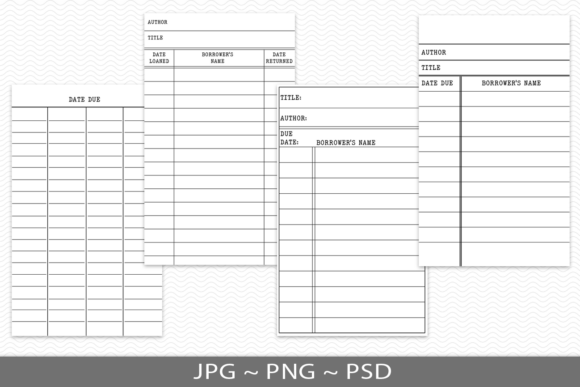
- 4 PNG graphic overlays: These feature black graphics on a transparent background. This transparency is crucial because it allows the cards to blend seamlessly onto any colored or textured background without requiring manual cutouts.
- 4 black on white JPG cards: These are standard image files ideal for quick printing or simple drag-and-drop usage in programs that do not support layers.
- 4 PSD editable files: For those using Adobe Photoshop, these layered files allow for deep customization. You can change text, adjust colors, or modify individual elements within the card design.
The inclusion of both flat images (JPG/PNG) and layered files (PSD) means the product caters to a wide spectrum of technical proficiency. A beginner might stick to the PNGs, while a seasoned graphic designer will appreciate the editability of the PSDs.
Why Different Creators Value These Assets
The appeal of vintage library cards extends beyond simple aesthetics. Different audiences prioritize different aspects of these files based on their goals, workflow, and end products.
For Junk Journalers and Digital Scrapbookers
Hobbyists who enjoy junk journaling often seek elements that mimic real-world ephemera. Vintage library cards are iconic symbols of literary history. In a digital journal, these overlays add instant authenticity. Because the PNGs have transparent backgrounds, users can place them over scanned paper textures, watercolor washes, or fabric patterns. The result looks like a physical card was glued onto the page. For this group, the priority is visual realism and ease of layering. They do not need to edit the text on the card; they need it to look authentic immediately.
For Graphic Designers and Professional Marketers
Professionals approach these assets with a focus on flexibility and commercial viability. A marketer creating a campaign for a local bookstore or a literacy nonprofit might use these cards as part of a larger layout. The PSD files are particularly valuable here. A designer can open the file, replace the generic title with a specific book name or event date, and adjust the font to match brand guidelines. The ability to edit ensures that the asset does not look like a generic stock photo but rather a custom-designed element. Speed is also a factor; starting with a pre-made vintage structure saves hours of drawing lines and sourcing old-fashioned fonts.
For Educators and Publishers
Educators often create worksheets, reading logs, or classroom decorations. A vintage library card theme can make reading assignments feel more engaging and less like a chore. For this audience, clarity and printability are key. The black-on-white JPGs are excellent for high-contrast printing, ensuring that lines and text remain sharp even on standard office printers. Furthermore, educators may use the editable PSDs to create personalized reading challenge cards for students, inserting names or specific book titles directly into the design.
For Entrepreneurs and Small Business Owners
Small business owners, particularly those in the stationery or gift industry, may use these designs to create physical products. Think of bookmarks, gift tags, or packaging inserts. The commercial value of these files depends on the licensing terms, but assuming proper rights are secured, the high-resolution nature of the files ensures they print clearly on cardstock or kraft paper. Entrepreneurs value the consistency of having a matched set of four designs, allowing them to create cohesive product lines without hiring a designer for each variation.
Evaluating Quality and Usability
When considering whether Vintage Style Library Cards, PNG, PSD resources are right for your project, several factors should guide your decision. Not all digital assets are created equal, and understanding the technical specifications helps avoid frustration later.
Resolution and Clarity: High-quality overlays must be crisp. Blurry edges ruin the vintage illusion, making the design look amateurish. Ensure the files are provided at a resolution suitable for your intended output, typically 300 DPI for print and 72–150 DPI for web use.
Transparency Accuracy: For the PNG overlays, the transparency must be clean. There should be no white halos or jagged edges around the black lines. This allows for seamless blending modes in software like Procreate, Photoshop, or Canva. If the transparency is poor, you will spend more time cleaning up the image than using it.
Editability Depth: If you opt for the PSD files, check if the text layers are truly editable. Some "editable" files merely flatten the text into an image layer, which defeats the purpose. True PSD files keep text layers intact, allowing you to type new content using your preferred fonts.
Practical Applications Across Platforms
To visualize how these files fit into a workflow, consider these practical scenarios:
- Social Media Content: A book blogger can use the PNG overlay on a photo of their current read. By placing the transparent library card over the book cover image, they create a stylish frame for their review text. This adds a professional, branded look to Instagram or Pinterest posts.
- Digital Planners: Users of GoodNotes or Notability can import the PNGs as stickers. They can then write directly on top of the digital card using an Apple Pencil, tracking their monthly reading goals in a visually appealing way.
- Wedding or Event Invitations: For a literary-themed wedding or book launch party, the editable PSDs can be customized with event details. Printed on textured paper, these cards serve as unique invitations or table numbers.
Making the Right Choice for Your Needs
Ultimately, the decision to use these assets depends on your specific project requirements. If you are a beginner with limited software skills, the JPG and PNG files offer a low-barrier entry point. You can drag, drop, and resize them in almost any application. If you are an experienced creator looking for total control, the PSD files provide the necessary depth for customization.
Consider your end goal. Are you creating something for personal enjoyment, where speed and ease are paramount? Or are you producing commercial materials where uniqueness and brand alignment are critical? Vintage Style Library Cards, PNG, PSD packages offer a balanced solution that serves both ends of this spectrum. By providing multiple formats, these resources respect the diverse workflows of modern creators, ensuring that everyone from the casual hobbyist to the professional designer can find value in the nostalgic charm of the library card.
Before downloading, always verify the license agreement to ensure your intended use—whether personal or commercial—is permitted. With the right preparation and a clear understanding of your tools, these vintage overlays can elevate your designs, adding a touch of literary history to your modern creative endeavors.