Mastering the Decorative Phone Holder Lasercut: A Guide to Precision and Design
In the world of digital fabrication, few projects offer the perfect blend of utility and aesthetic appeal quite like a decorative phone holder lasercut. Whether you are a hobbyist looking to personalize your workspace or an entrepreneur aiming to add unique items to your Etsy shop, these designs serve as an excellent entry point into laser cutting. However, the gap between a downloaded file and a finished, professional-quality product is often wider than beginners anticipate. Many creators rush into production without fully understanding the nuances of material selection, file compatibility, and structural integrity, leading to wasted resources and frustration.
This guide aims to bridge that gap. By addressing common pitfalls and offering practical advice on handling cutting files, we will help you achieve cleaner cuts, better fits, and more satisfying results. The goal is not just to cut a shape, but to create a functional piece of art that stands up to daily use.
Understanding the File Formats You Receive
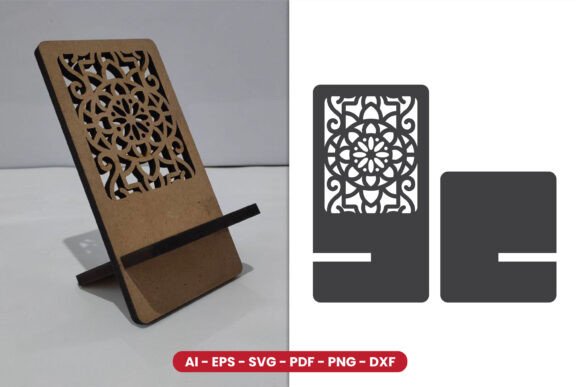
One of the most frequent sources of confusion for new laser cutter users is the variety of file formats included in a design package. When you purchase or download a decorative phone holder lasercut design, you typically receive a bundle including SVG, AI (CS6), EPS, DXF, PDF, and high-quality PNG files. It is crucial to understand that not all these files are created equal for every machine.
SVG and DXF are generally the safest bets for most hobbyist lasers, such as Glowforge, xTool, or K40 machines. They are vector-based, meaning they define paths rather than pixels, ensuring your laser follows precise lines for cutting. On the other hand, AI and EPS files are industry standards preferred by professionals using software like Adobe Illustrator or CorelDRAW. If you attempt to open an AI file in a basic viewer that doesn’t support vectors, you may end up with a rasterized image, which is useless for cutting.
A common mistake is relying on the PNG file for cutting. PNGs are raster images, composed of pixels. While they are excellent for previewing the design or for print-on-demand services, using them for laser cutting requires tracing, which often results in jagged edges and inaccurate dimensions. Always prioritize vector formats (SVG, DXF, AI) for the actual cutting process to maintain the integrity of the intricate details inherent in lasercut designs.
The Critical Importance of Material Thickness
Perhaps the most overlooked detail in laser cutting projects is material thickness. The design specifications for this particular phone holder explicitly state that it uses MDF material with a thickness of 6mm. This is not a suggestion; it is a structural requirement. Laser cut designs often rely on friction fits, slots, and tabs that are calculated to specific tolerances based on the material's thickness.
If you substitute 6mm MDF with 3mm plywood or 4mm acrylic without adjusting the file, the joints will be loose, and the holder will likely collapse under the weight of a smartphone. Conversely, trying to force 8mm material into 6mm slots can crack the material or damage your laser lens due to excessive resistance. Before you begin, measure your material with calipers, not just a ruler. "Nominal" thicknesses often vary slightly from batch to batch, and even a 0.5mm difference can compromise the stability of a phone holder.
For those who wish to use different materials, such as walnut or birch plywood, you must scale the slot widths in your vector software. This requires a basic understanding of how to offset paths or adjust node positions in programs like Inkscape or Illustrator. Ignoring this step leads to wobbly, unusable products that fail to protect the device they are designed to hold.
Design Complexity and Cutting Time
Decorative elements add charm, but they also increase cutting time and the risk of burn marks. Intricate patterns, while visually stunning, require the laser head to make thousands of small turns and stops. This generates significant heat in localized areas, which can cause charring, especially on MDF. A common error is running the laser at full power and high speed to save time, which often results in incomplete cuts or excessive smoke residue.
To avoid this, perform test cuts on scrap pieces of the same material. Adjust your power and speed settings to find the sweet spot where the laser cuts through cleanly without burning the edges excessively. For detailed sections of a decorative phone holder lasercut, consider using air assist if your machine supports it. Air assist blows away debris and cools the cut zone, resulting in cleaner edges and reduced flame risks.
Additionally, consider the order of operations. Always cut internal details before external outlines. If you cut the outer perimeter first, the piece may shift slightly during the cutting of internal decorative elements, causing misalignment. Most modern laser software handles this automatically, but it is worth verifying your job setup to ensure precision.
Post-Processing and Finish Quality
The job isn't done when the laser stops. MDF, in particular, leaves behind soot and char marks that need to be addressed for a professional finish. Many beginners skip this step, presenting a product that looks burnt and cheap. To elevate your work, gently sand the edges with fine-grit sandpaper after cutting. This removes char marks and smooths out any minor imperfections from the laser beam.
For a more polished look, consider applying a clear sealant or wood stain. This not only enhances the natural grain of the wood (if using plywood) or provides a uniform color (for MDF) but also protects the material from moisture and wear. A well-finished phone holder feels substantial and valuable, increasing its perceived worth whether you are giving it as a gift or selling it.
Choosing the Right Design for Your Needs
When evaluating different designs, look beyond the aesthetic. Consider the functionality. Does the holder accommodate phones with thick cases? Is the viewing angle ergonomic for video calls or watching media? A beautiful design that fails to hold a phone securely at a comfortable angle is ultimately flawed. Look for designs that include adjustable angles or wide slots to accommodate various device sizes.
Furthermore, check the licensing terms of the files you download. Some creators allow personal use only, while others permit commercial sales. Respecting intellectual property rights is essential for maintaining a healthy creative community. If you plan to sell your creations, ensure you have the appropriate commercial license or choose designs explicitly marked for commercial use.
In conclusion, creating a high-quality decorative phone holder lasercut requires attention to detail, from selecting the correct file format to respecting material constraints and finishing techniques. By avoiding common mistakes and adopting a methodical approach, you can transform simple digital files into tangible, useful, and beautiful objects. Whether you are refining your skills or launching a new product line, these principles will help you achieve consistent, professional results.