Reversible Open Closed Door Sign: A Practical Guide to Design, Fabrication, and Workflow Integration
In the daily operations of a small business, clarity is not just a courtesy; it is a functional necessity. For café owners, salon managers, retail shopkeepers, and independent consultants, the status of your physical space dictates customer behavior. A Reversible Open Closed Door Sign serves as the primary interface between your internal workflow and external foot traffic. While often overlooked as a minor detail, this simple tool plays a critical role in managing expectations, reducing interruptions, and maintaining a professional brand image.
Integrating a high-quality, custom-designed sign into your business infrastructure requires more than just purchasing a generic plastic tag. It involves understanding material properties, design compatibility with laser cutting technology, and the practicalities of daily use. Whether you are fabricating this asset yourself using a desktop laser cutter or outsourcing the production to a local maker space, the process offers an opportunity to enhance your storefront’s aesthetic while solving a logistical problem.
The Role of Clear Signage in Business Operations
Before diving into the technical aspects of fabrication, it is essential to understand where this sign fits within your broader operational workflow. The door sign is the first point of contact for anyone approaching your premises. Its primary function is binary communication: accessible or inaccessible. However, the execution of this communication impacts perceived professionalism.
A flimsy, handwritten note taped to glass suggests transience or disorganization. In contrast, a structured, multi-layered Reversible Open Closed Door Sign conveys stability and attention to detail. This distinction matters significantly for service-based businesses where trust and reliability are paramount. When clients see a well-crafted sign, they subconsciously register that care is taken in other areas of the business, from customer service to product quality.
Furthermore, the reversible nature of the design supports efficient daily routines. Staff members do not need to search for separate "Open" and "Closed" placards or worry about losing one half of the set. The single-unit design ensures that the correct status is always available, reducing friction during opening and closing procedures. This simplicity is a key component of lean operational management, removing unnecessary steps from standard operating procedures.
Design Architecture and Material Selection
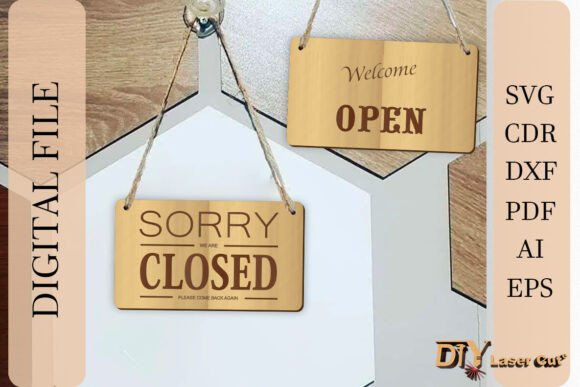
The effectiveness of a laser-cut sign depends heavily on its structural design and material choice. The featured Reversible Open Closed Door Sign utilizes a three-layer architecture. This approach is not merely decorative; it provides depth, durability, and visual contrast that flat signs lack.
- The Base Layer: Typically the largest piece, acting as the structural foundation and border. This layer anchors the sign to the door and provides the primary color or texture contrast.
- The Middle Layer: Often used to create a recessed effect or to highlight specific design elements, such as the decorative frame mentioned in the product features. This layer adds dimensionality.
- The Text Panel: The top layer contains the actual "Open" and "Closed" typography. Because the sign is double-sided, this panel must be designed with symmetry in mind, ensuring legibility from both orientations.
Material selection is equally critical and should align with your brand identity and environmental conditions. Wood offers a warm, artisanal feel suitable for bakeries, boutiques, and craft studios. Acrylic provides a sleek, modern look ideal for tech offices, salons, and contemporary retail spaces. When preparing your files for cutting, you must account for the kerf (the width of the laser beam) and material thickness. The customizable nature of the provided vector files allows you to adjust dimensions to fit standard door handles or specific mounting hardware.
Workflow Integration: From Digital File to Physical Asset
Creating a functional sign from a digital download involves a specific sequence of steps. Understanding this workflow helps prevent common errors such as misaligned layers or incompatible file formats. The process begins with the acquisition of the correct digital assets.
File Preparation and Compatibility
The included vector files come in multiple formats: .SVG, .DXF, .CDR, .PDF, .AI, and .EPS. This variety ensures compatibility with a wide range of software and hardware. If you are using a Glowforge, Epilog, Trotec, or other popular laser cutters, you can import these files directly into your machine’s proprietary software or use intermediate tools like Adobe Illustrator, CorelDRAW, or Inkscape.
Before sending the job to the laser, perform a thorough review of the vector paths. Ensure that all lines are closed and that there are no overlapping nodes that could cause the laser to burn the same area twice, resulting in charring or weakened structural integrity. Check the scale of the design against your intended material size. It is advisable to run a test cut on scrap material of the same thickness to verify fit and alignment of the three layers.
Cutting and Assembly Process
Once the files are optimized, the cutting phase begins. Different materials require different power and speed settings. For wood, focus on achieving clean edges without excessive charring. For acrylic, ensure the flame-polished edge is smooth and free of stress marks. After cutting, the assembly process is straightforward but requires precision.
- Clean the Parts: Remove any smoke residue or protective film from the cut pieces. Use appropriate cleaners for your chosen material (e.g., isopropyl alcohol for acrylic).
- Dry Fit: Assemble the three layers without adhesive to check alignment. Ensure the "Open" and "Closed" texts are oriented correctly relative to the hanging mechanism.
- Adhesion: Apply a thin, even layer of adhesive suitable for your materials. Wood glue works for wooden layers, while solvent-based cements are ideal for acrylic. Clamp or weight the assembly until the bond is secure.
- Hardware Installation: Attach the hanging mechanism. This could be a leather strap, a metal chain, or a rigid bracket, depending on the design specifications and door type.
Practical Implementation and Maintenance
After fabrication, the sign becomes part of your daily routine. Proper installation and maintenance ensure longevity and continued professionalism. When hanging the sign, consider the height and visibility. It should be easily readable from a distance but not obstruct the view through the door or interfere with door operation.
For businesses with high traffic, durability is a concern. Regularly inspect the adhesive bonds and the hanging hardware. If the sign begins to swing excessively or hit the door frame, consider adding a small rubber bumper or adjusting the strap length. Cleaning should be done with non-abrasive cloths to preserve the finish of the wood or acrylic.
From a licensing perspective, it is important to adhere to the usage policy. The digital files are licensed for personal and commercial use in creating physical products. This means you can sell the physical signs you make, but you cannot redistribute or resell the digital vector files themselves. Respecting these intellectual property boundaries supports the creator ecosystem and ensures continued access to high-quality design resources.
Enhancing Brand Consistency Through Customization
One of the significant advantages of using a customizable laser-cut file is the ability to align the sign with your brand guidelines. While the core design features the standard "Open" and "Closed" text, the surrounding frame and material choices offer room for customization. You might choose a wood stain that matches your interior furniture or an acrylic color that complements your logo palette.
This level of customization transforms a utilitarian object into a brand asset. It reinforces visual consistency across all touchpoints, from your business cards to your storefront. For entrepreneurs and marketers, this attention to detail contributes to a cohesive brand narrative, signaling that every aspect of the business has been considered with care.
In conclusion, a Reversible Open Closed Door Sign is more than a simple indicator; it is a functional component of your business infrastructure. By selecting the right materials, preparing digital files correctly, and integrating the sign into your daily workflows, you enhance both operational efficiency and customer experience. Whether you are a hobbyist looking to upgrade your home office or a business owner refining your storefront, this project offers a tangible way to improve your professional presence.