Daffodil Swag: Maximizing Quality in Your Digital Ephemera Projects
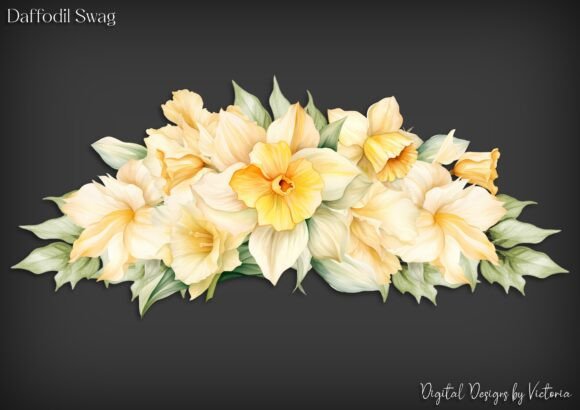
Springtime crafting brings a unique energy, characterized by bright yellows, fresh greens, and the promise of renewal. For digital crafters, junk journal enthusiasts, and small business owners selling handmade goods, finding the right assets is crucial. This is where Daffodil Swag enters the conversation. It is not merely a collection of clipart; it is a curated set of digital resources designed to elevate the aesthetic of your physical and digital projects. However, possessing high-quality files is only half the battle. Many creators stumble not because their tools are inadequate, but because they misunderstand how to leverage layered digital assets effectively.
When you purchase a pack like Daffodil Swag, you are receiving more than just images. You receive six PNG files, with each layer on its own transparent background, plus one grouped file for easier resizing. Additionally, you get the grouped file on a JPG background for fussy cutting if you prefer that method. Each file is saved at 300 DPI, ensuring the best quality for printing and resizing. While this sounds straightforward, the difference between a amateur-looking project and a professional-grade piece often lies in how these specific technical features are utilized.
The Trap of Ignoring Layered Flexibility
A common mistake among beginners, and even some seasoned hobbyists, is treating a multi-layer PNG pack as a single, static image. They download the "grouped" file and use it exclusively, missing the primary advantage of the product: modularity. When you use the grouped file alone, you lose the ability to manipulate individual elements. For instance, you might want to place a daffodil stem behind a text box while keeping the flower head in front. If you are working with a flat, grouped image, this depth effect is impossible without complex masking or erasing tools that can degrade image quality.
The Better Approach: Take the time to import the individual layered PNGs into your design software. Whether you are using Procreate, Photoshop, Canva, or Affinity Designer, keeping elements separate allows for dynamic composition. You can rotate a single leaf without affecting the flower, or change the opacity of the stem to create a watercolor bleed effect. This level of control transforms a simple sticker into a cohesive part of your layout.
Misunderstanding Resolution and Scaling
Another frequent oversight involves resolution management. The Daffodil Swag files are provided at 300 DPI (dots per inch), which is the gold standard for high-quality printing. However, users often confuse screen resolution with print resolution. A common error is dragging a small digital asset onto a large canvas and stretching it beyond its intended dimensions. Even at 300 DPI, every pixel has a limit. Over-scaling leads to pixelation, blurriness, and a loss of the crisp edges that define professional ephemera.
Conversely, some creators underestimate the power of the 300 DPI baseline. They assume that because an image looks sharp on their phone, it will look sharp on paper. This is rarely the case. Printers require significantly more data than screens do. If you are creating items for sale, such as greeting cards or journal inserts, failing to respect the native resolution can result in customer complaints about print quality.
Practical Advice: Always check the pixel dimensions of your source file before starting. If you need a larger image, start with the largest grouped file provided and scale down if necessary, rather than scaling up a smaller element. Remember that the transparent background PNGs are ideal for digital layering, but if you are printing at home and lack advanced editing software, the JPG version provided for fussy cutting is a viable, high-resolution alternative.
The Fussy Cutting Misconception
The inclusion of a JPG background file in the Daffodil Swag pack is specifically designed for those who enjoy fussy cutting—printing out images and cutting them out by hand. Yet, many digital-native creators overlook this file entirely, assuming it is inferior to the transparent PNGs. This is a missed opportunity for tactile crafters. The JPG background provides a visual boundary that can make it easier to see exactly where to cut, especially for intricate floral shapes with thin stems or delicate petals.
However, a mistake often made here is printing the JPG on standard printer paper. Standard copy paper is too thin for junk journaling or scrapbooking; it tears easily and bleeds through when glue is applied. To truly benefit from the fussy-cutting option, you must print on cardstock or photo paper. This ensures the durability of your ephemera and maintains the vibrancy of the daffodil colors.
Color Accuracy and Printing Profiles
What you see on your monitor is not always what you get on paper. This is known as color gamut discrepancy. Daffodils rely heavily on subtle gradients of yellow and green. On a backlit screen, these colors appear vibrant and luminous. On paper, they can appear muted or muddy if not managed correctly. A frequent error is ignoring printer settings. Using "draft" mode or incorrect paper type settings in your printer dialog box can drastically alter the output.
To avoid disappointment, always perform a test print. Print one sheet of the Daffodil Swag elements on the exact paper you intend to use for your final project. Check the yellows—are they too pale? Are the greens too dark? Adjust your printer’s color settings accordingly. This small step saves time, money, and materials in the long run.
Licensing and Commercial Use Clarity
For entrepreneurs and small business owners, understanding usage rights is critical. While the technical aspects of Daffodil Swag are designed for ease of use, the legal aspect requires attention. Many creators assume that because they bought the file, they can use it in any way they wish. This is not always true. Some licenses allow for personal use only, while others permit commercial use with restrictions, such as prohibiting the resale of the digital file itself.
Before incorporating these assets into products you plan to sell on platforms like Etsy or at local craft fairs, review the license agreement included with your download. If you are creating physical items like cards or journals, you are generally safe, but if you are creating digital templates or print-on-demand designs, ensure your usage complies with the creator’s terms. Ignoring this can lead to takedown notices or account suspensions, which are far more costly than the initial price of the ephemera pack.
Optimizing Workflow for Efficiency
Finally, consider your workflow. Downloading six separate PNGs and one JPG can feel cluttered if not organized. A best practice is to create a dedicated folder for each project. Inside, keep the original Daffodil Swag files untouched as a backup. Create a subfolder for "Edited" or "Working" files. This prevents accidental overwrites and ensures you always have access to the pristine, 300 DPI originals if a mistake is made during the design process.
By avoiding these common pitfalls—ignoring layers, mishandling resolution, overlooking fussy-cutting potential, neglecting color calibration, and misunderstanding licensing—you can fully harness the potential of Daffodil Swag. These digital assets are versatile tools capable of enhancing card making, junk journaling, and scrapbooking. The key lies in respecting the technical specifications provided and applying them with intention. When you combine high-quality resources with informed techniques, your creative output naturally improves, resulting in projects that are not only beautiful but professionally executed.