Bow Stamp Brushes for Procreate: Elevating Your Digital Designs with Precision and Charm
Digital illustration has evolved from a niche hobby into a robust professional toolset, yet many creators still struggle with the balance between efficiency and aesthetic quality. When designing invitations, digital stickers, or planner layouts, the difference between a polished product and an amateur attempt often lies in the details. This is where specialized tools like Bow Stamp Brushes for Procreate become indispensable. Rather than spending hours manually drawing complex ribbons and folds, artists can leverage pre-designed stamps to add instant elegance. However, simply downloading a brush pack is not enough. To truly benefit from these assets, you must understand how to integrate them seamlessly into your workflow while avoiding common pitfalls that diminish their impact.
The Misconception of "Plug-and-Play" Simplicity
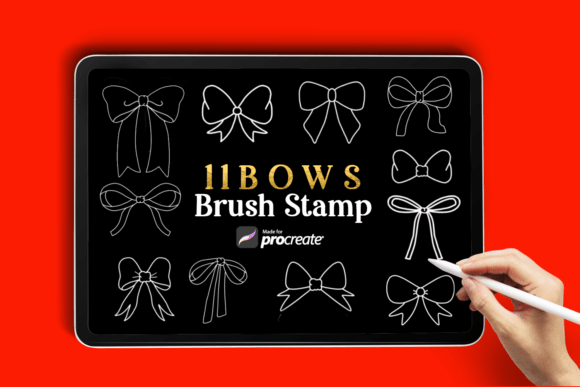
A frequent misunderstanding among beginners is the belief that stamp brushes require no artistic input. The assumption is that tapping the screen will automatically yield a perfect result that fits any context. While the Bow Stamp Brush Collection includes 11 high-quality designs ranging from simple ribbons to elaborate decorative bows, treating them as static clipart limits their potential. If you place a bow without considering perspective, lighting, or color harmony, it will look disjointed from the rest of your artwork. This disconnect can make even the most beautiful design feel cheap or outsourced.
To avoid this, view each stamp as a base layer rather than a final element. After placing a bow, adjust its opacity and blend mode to ensure it interacts naturally with underlying textures. For instance, if your background has a watercolor texture, setting the bow’s blend mode to "Multiply" can help it appear as though it was painted on the same surface. This small adjustment transforms a digital sticker into an integrated part of your composition, enhancing the overall professionalism of your piece.
Overlooking Scale and Proportion
One of the most critical errors creators make is ignoring scale. A bow that looks elegant on a large wedding invitation may appear clunky and overwhelming on a small social media story or a delicate planner sticker. Many users download the .brushset file and begin using the default size without testing proportions against other elements in their canvas. This oversight can disrupt the visual hierarchy, drawing attention away from the main subject rather than complementing it.
Before finalizing your design, step back and evaluate the relationship between the bow and surrounding text or imagery. Use the two-finger pinch gesture in Procreate to resize the stamp dynamically. A good rule of thumb is to ensure the bow does not compete with primary text for attention. If you are creating a set of cohesive brand assets, maintain consistent sizing ratios across all designs. This consistency builds brand recognition and ensures a polished, professional appearance across various platforms.
Neglecting Color Customization
Another common mistake is using the default black or gray color of the brush stamp without modification. While the Bow Stamp Brushes for Procreate are designed to be versatile, leaving them in their default state often results in a flat, lifeless look. Digital art thrives on depth and variation. By failing to customize the hue, saturation, and brightness, you miss the opportunity to align the bow with your specific color palette.
Take advantage of Procreate’s robust color adjustment tools. After stamping the bow, use the "Hue, Saturation, Brightness" adjustment to match the accent colors of your project. For a more advanced technique, try clipping a gradient map to the bow layer. This allows you to create multi-tonal ribbons that mimic the sheen of satin or silk. Experimenting with these settings unlocks endless creative combinations, allowing you to tailor each of the 11 unique designs to fit seasonal themes, brand identities, or personal styles.
Ignoring File Compatibility and Organization
Technical oversights can also hinder your creative process. Some users attempt to import brush sets into incompatible versions of Procreate or fail to organize their libraries effectively. The Ready-to-import .brushset file included in this collection is compatible with modern versions of Procreate and optimized for Apple Pencil pressure sensitivity. However, if your app is outdated, you may experience lag or missing features. Always ensure your software is updated to the latest stable version to guarantee smooth performance.
Furthermore, cluttered brush libraries can slow down your workflow. Instead of leaving the new bows in the default "Imported" folder, create a dedicated group named "Decorative Elements" or "Stamps." This organizational habit saves time during intense creative sessions, allowing you to locate the right tool instantly. Efficient organization is a hallmark of professional digital artists, enabling them to maintain momentum and focus on creativity rather than navigation.
Choosing Quality Over Quantity
In the digital marketplace, it is tempting to download every free brush pack available. However, quantity rarely equals quality. Low-resolution stamps can pixelate when scaled up, ruining the crispness of your design. The Bow Stamp Brushes for Procreate mentioned here are crafted with high-quality vectors in mind, ensuring they remain sharp regardless of size. When evaluating brush packs, always check the resolution and read reviews regarding edge cleanliness. Blurry or jagged edges are immediate red flags that indicate poor craftsmanship.
Investing in a curated collection like this one, which offers 11 distinct and carefully designed bows, is far more valuable than having hundreds of mediocre options. Each design in this pack serves a specific purpose, from minimalistic ties for corporate headers to ornate bows for festive greeting cards. By selecting tools that prioritize precision and versatility, you elevate the standard of your work and reduce the time spent correcting errors.
Practical Steps for Integration
To maximize the value of your new tools, follow these practical steps:
- Test Before Committing: Create a sandbox canvas to experiment with all 11 bow designs. Adjust their size, rotation, and opacity to understand their flexibility.
- Layer Wisely: Always keep stamp brushes on separate layers. This non-destructive approach allows you to move, resize, or delete elements without affecting the rest of your artwork.
- Combine with Hand-Drawn Elements: For a unique touch, use the Apple Pencil to add subtle hand-drawn shadows or highlights around the stamped bow. This hybrid approach blends efficiency with personal artistic flair.
- Check Licensing: Ensure you understand the usage rights, especially if you plan to sell products featuring these designs. Most premium brushes allow commercial use, but verifying this protects your business interests.
By approaching Bow Stamp Brushes for Procreate with a mindset of customization and integration, you transform simple stamps into powerful design assets. Avoid the trap of passive usage; instead, actively manipulate these tools to serve your creative vision. With careful attention to scale, color, and composition, you can add a touch of sweetness and charm to your digital art that resonates with your audience and enhances your professional reputation.